
Introduction
This page standardizes key analytics terms, formulas, and inclusion rules used across Altegio. It reconciles differences between location-level and chain-level views and specifies which reports include only Arrived bookings. References point to Altegio’s official documentation.
Key concepts and data scope
- Unique client identity (chain-wide): Clients are unified across locations in the chain client database; the customer chain card shows consolidated spend, visits, loyalty, and messages. This prevents double counting across locations. See chain client database and customer chain card. Chain client database • Customer chain card • Chain analytics overview
- Booking statuses and data filters: Appointment status values include No-show, Pending, Arrived, and Confirmed. Many financial/HR and several analytics reports count only bookings with Arrived status. Reports > Appointments (status refs) • Payroll – Settlements (Arrived-only)
Canonical metrics
Returning customers (count)
- Definition: Number of past customers who visited again within the selected current period. Independent of the “loss period” setting. Counted at chain scope when viewing chain analytics (deduplicated across locations). Only Arrived visits are considered when a report explicitly states Arrived-only. Returning vs retention
Customer retention rate (CRR, %)
- Definition: Of customers who had Arrived visits in the previous period (the configured loss period window), the share who returned with an Arrived visit in the current period.
- Formula: CRR = Returned_in_Current / Cohort_Previous × 100%.
- Notes: Values are rounded (minor tenths-of-a-percent discrepancies can appear). Returning vs retention • Loss period setting
Lost clients (count)
- Definition: Clients with no Arrived visit for at least N days, where N is the configured loss period. At chain scope, “lost to the chain” excludes clients who still visit another chain location. Loss period setting
Cancellations and no-shows
- Canceled appointments: Explicitly deleted/removed visits within the selected period; visible in appointment reports and analytics. Reports > Appointments
- No-shows: Visits marked “client has not arrived” (No-show). Analytics surfaces the count/ratio over the selected period. Statistics & analytics
Booking source attribution
- Dashboard and reports display where bookings originated (e.g., website widget, social channels, maps). Attribution is available in analytics dashboards; widget-level event streams can be sent to GA4/Meta for deeper source analysis. Statistics & analytics • Online booking analytics integration • GA4 setup • Event catalog
Loss period configuration (controls CRR and “Lost clients”)
- Configure at Analytics > Settings > Retention. The loss period defines: (1) the previous period for CRR cohorts, and (2) the inactivity threshold for “Lost clients.” Chain scope distinguishes “lost to the location” vs “lost to the chain.” Loss period setting
Inclusion rules and status handling
- Arrived-only reports: The Staff chain report and Services chain report calculate outputs from bookings with Arrived status only. This aligns analytics with payroll and cost allocation. Staff chain report • Services chain report • Payroll – Settlements
- Cancellations and No-shows are visible in dashboards and appointment exports, but excluded from Arrived-only reports unless a given report defines otherwise. Reports > Appointments • Statistics & analytics
Chain analytics and unified identity
- Chain-wide deduplication: A single client visiting multiple locations is counted once at chain scope; communications are consolidated to prevent duplicate outreach. Chain analytics overview • Chain client database
Staff, services, and chain reports (Arrived-only where specified)
- Staff chain report: Earnings, service/product sales, hours worked, cost/hour, share of revenue; filters by period/location; Excel export with download logging. Staff chain report
- Services chain report: Count of services provided, discounts, payments (cash/accounts), consumables cost, payroll, profit, and % of total revenue; filters by service/service category/employee/location. Services chain report
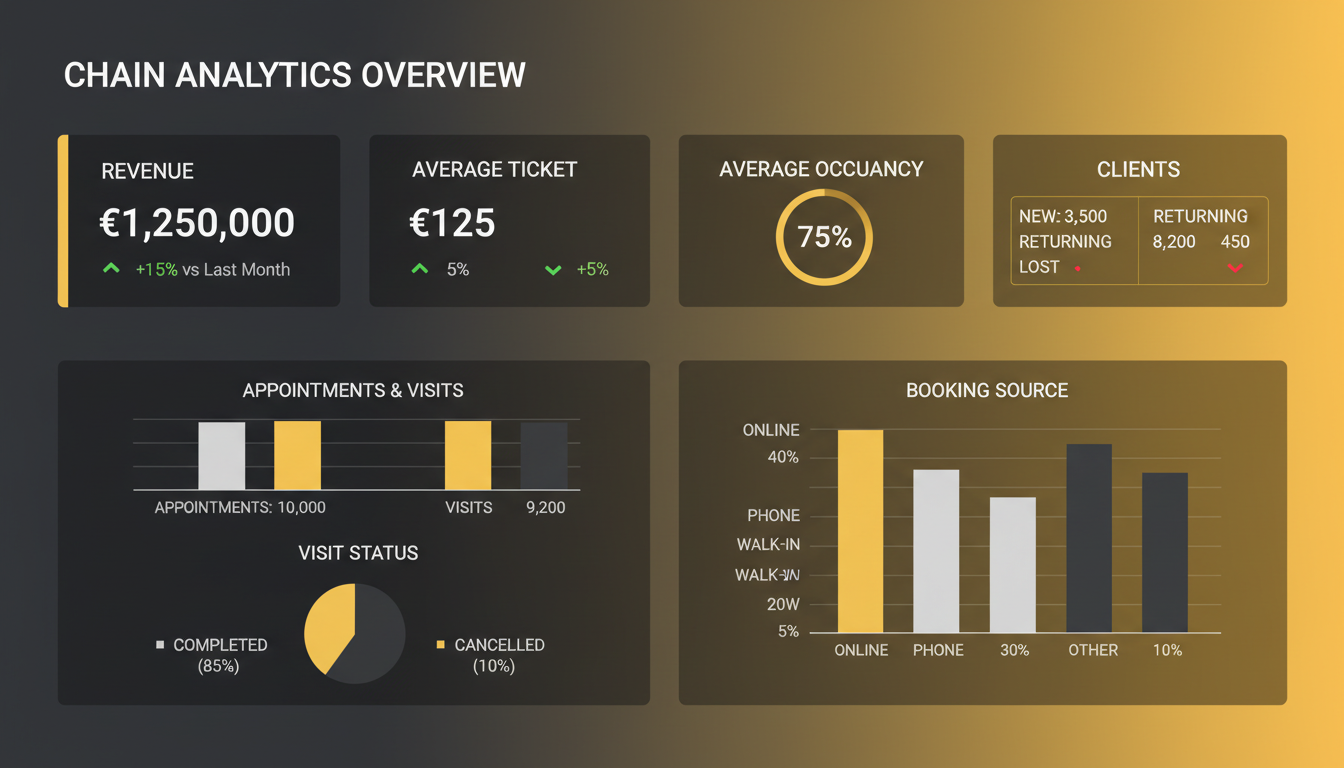
- Chain analytics tasks: Average spend, total earnings, occupancy, booking/revenue dynamics aggregated across locations; unified client history and employee summaries across sites. Chain analytics overview
Dashboards and KPI views
- Company and employee KPIs on one screen: track booking sources, cancellations, no-shows, lost clients, occupancy, and revenue; group branches for segmented views. Statistics & analytics • UK analytics page
Instrumentation and data attribution
- GA4 integration: Connect a GA4 stream per online booking link; verify via Realtime. GA4 setup
- Event taxonomy: The booking widget emits events (e.g., widget_loaded, service_selected, booked, appointment_changed) to GA4/Meta for funnel and source analysis. Event catalog
- Client ID stitching (UA legacy): Passing a custom Client ID enables end‑to‑end analytics between GA and CRM; expect latency before data appears. Client ID transfer • Note: no web analytics guarantees 100% accuracy; cross-source variances may occur. Online booking analytics
Worked examples
- Returning customers vs. CRR: If 100 clients had Arrived visits in the previous (loss) period and 20 of them arrived again in the current period, CRR = 20%. Returning customers for the current period is simply the count of past clients who arrived this period (independent of the loss period). Returning vs retention
Appendix: Canonical metric table
| Metric | Definition | Numerator | Denominator | Inclusion filter | Scope |
|---|---|---|---|---|---|
| Returning customers | Past clients who visited again in the current period | Count of unique clients with Arrived visits in current period who had any prior visit | n/a | Arrived where report specifies | Location or Chain (deduped) [1] |
| Customer retention rate | % of prior-period clients who returned | Unique clients with Arrived visits in current period AND in prior (loss) period | Unique clients with Arrived visits in prior (loss) period | Arrived-only | Location or Chain [2] |
| Lost clients | Clients inactive ≥ loss period | Unique clients with no Arrived visit for N days | n/a | Arrived-only (for activity checks) | Location vs Chain distinction [2] |
| No-shows | Visits marked “client has not arrived” | No-show visits in period | n/a | Status = No-show | Location or Chain [3] |
| Cancellations | Deleted/removed visits in period | Canceled visits in period | n/a | Status = Canceled/Removed | Location or Chain [4] |
| Staff performance | Staff revenue, hours, cost/hour, share | Sums from Arrived bookings | n/a | Arrived-only | Chain Staff report [5] |
| Service performance | Volume, discounts, consumables, payroll, profit | Sums from Arrived bookings | n/a | Arrived-only | Chain Services report [6] |
[1] Chain client database and chain analytics prevent duplicates across locations. [2] Loss period drives CRR cohort and “lost” logic; chain vs. location loss is distinguished. [3][4] Visible in dashboards/exports. [5][6] Chain reports explicitly include Arrived-only.
Sources: Returning vs retention • Loss period • Chain client database • Chain analytics overview • Staff chain report • Services chain report • Statistics & analytics • Reports > Appointments • Online booking analytics • GA4 setup • Event catalog